Python从入门到实践

敬请T期待 Lv3

字符串

概念定义

字符串是一系列字符

使用字符串

  1. 字符串元素的大小写
1
2
3
4
5
name="Ada Lovelace"
print(name)
print(name.title())#首字母大写
print(name.upper())#所有字母大写
print(name.lower())#所有字母小写
1
2
3
4
Ada Lovelace
Ada Lovelace
ADA LOVELACE
ada lovelace
  1. 删除字符串空白

    1
    2
    3
    4
    5
    6
    7
    8
    9
    >>>language=' python 
    >>>language
    ' python '
    >>>language.lstrip()#删除左端空白
    'python '
    >>>language.rstrip()#删除右端空白
    ' python'
    >>>language.strip()#删除左右两端空白
    'python'
  2. 删除前缀

1
2
3
>>>nostarch_url="https://nostarch.com"
>>>nostarch_url.removeprefix('https://')
'nostarch.com'

列表

概念定义

列表(list)是由一系列按照特定顺序排列的元素组成

访问列表元素

  1. 利用元素的索引来访问元素值
1
2
3
4
5
6
7
8
9
10
11
bicycles=['trek','cannondale','redline','specialized']
print(bicycles[0])
print(bicycles[3])
print(bicycles[-1])
messages=f"My first bicycle was a {bicycles[0].title()}"'''在字符串中插入变量的值,使用f字符串,f为format的简写,Python通过把花括号的变量替换成变量的值来设置字符串的格式'''
print(messages)
#列表元素的索引是从0开始
'''列表元素索引为3的元素为specialized,而不是redline'''
"""索引-1表示列表的最后一个元素"""
#bicycles[0]为对象;title()为方法即函数;
#bicycles[0].title()为对象调用title()方法的形式
1
2
3
4
trek
specialized
specialized
My first bicyvle was a Trek
  1. 修改列表元素
1
2
3
4
5
6
#motorcycles.py
motorcycles=['honda','yamaha','suzuki']
print(motorcycles)

motorcycles[0]='ducati'
print(motorcycles)
1
2
3
['honda','yamaha','suzuki']
['honda','yamaha','suzuki']
['ducati','yamaha','suzuki']
  1. 添加列表元素
1
2
3
4
5
#motorcycles.py
motorcycles=['honda','yamaha','suzuki']

motorcycles.append('ducati')
print(motorcycles)
1
['honda','yamaha','suzuki','ducati']
  1. 删除列表元素

    • 使用del语句删除列表元素

      1
      2
      3
      4
      5
      6
      #motorcycles.py
      motorcycles=['honda','yamaha','suzuki']
      print(motorcycles)

      del motorcycles[1]
      print(motorcycles)
      1
      2
      ['honda','yamaha','suzuki']
      ['honda','suzuki']
    • 使用pop()方法删除列表元素,并返回删除值

      1
      2
      3
      4
      5
      6
      #motorcycles.py
      motorcycles=['honda','yamaha','suzuki']
      print(motorcycles)

      motorcycle=motorcycles.pop(0)#括号内为标索引则默认删除最后一个元素,并将其返回
      print(f"The first motorcycle I woned was a {motorcycle.title()}.")
      1
      2
      ['honda','yamaha','suzuki']
      The first motorcycle I woned was a honda.
    • 根据值删除元素

      1
      2
      3
      4
      5
      motorcycles=['honda','yamaha','suzuki','ducati']
      too_expensive='ducati'
      mororcycles.remove(too_expensive)
      print(motorcycles)
      print(f"\nA {too_expensive.title()} is too expensive for me!")
      1
      2
      3
      ['honda','yamaha','suzuki']

      A Ducati is too expensive for me!
  2. 使用sort()方法对列表进行永久排序

    • 正序(字母表)
    1
    2
    3
    4
    #cars.py
    cars = ['bmw','audi','toyota','subaru']
    cars.sort()
    print(cars)
    1
    ['audi','bmw','subaru','toyota']
    • 反序(反字母表)
    1
    2
    3
    4
    #cars.py
    cars = ['bmw','audi','toyota','subaru']
    cars.sort(reverse==True)
    print(cars)
    1
    ['toyota','subaru','bmw','audi']
  3. 使用sorted()方法对列表进行临时排序

    1
    2
    3
    4
    5
    6
    7
    8
    9
    10
    11
    #cars.py
    cars = ['bmw','audi','toyota','subaru']
    print("Here is the orignal list:")
    print(cars)

    print("Here is the sorted list:")
    print(sorted(cars))
    print(sorted(cars,reverse==True))

    pritn("Here is the orignal list agin:")
    print(cars)
    1
    2
    3
    4
    5
    6
    7
    Here is the orignal list:
    ['bmw','audi','toyota','subaru']
    Here is the sorted list:
    ['audi','bmw','subaru','toyota']
    ['toyota','subaru','bmw','audi']
    Here is the orignal list agin:
    ['bmw','audi','toyota','subaru']
  4. 反向打印列表

    1
    2
    3
    4
    5
    6
    #cars.py
    cars = ['bmw','audi','toyota','subaru']
    print(cars)

    cars.reverse()
    print(cars)
    1
    2
    ['bmw','audi','toyota','subaru']
    ['subaru','toyota','audi','bmw']
  5. 使用len()方法列表长度

    1
    2
    3
    #cars.py
    cars = ['bmw','audi','toyota','subaru']
    len(cars)
    1
    4

操作列表

  1. 遍历列表
1
2
3
magicians = ['alice','david','carolina']
for magician in magiccians:
print(magician)
1
2
3
alice
david
carolina
  1. 创建数值列表
1
2
3
4
#values.py
for value in range(1,5):
print(value)
#for 循环打印1-4的整数,range()方法是左闭右开区间[1,5)
1
2
3
4
1
2
3
4
1
2
3
#number_list.py
numbers = list(range(1,6))#使用强制转换将数字转换成列表
print(numbers)
1
[1,2,3,4,5]
1
2
3
#even_numbers_list.py
even_numbers = list(range(2,11,2))#range()方法有3个参数时,第三个参数为步长
print(even_numbers)
1
[2,4,6,8,10]
1
2
3
4
5
#square_numbers.py
for value in range(1,11):
square = value ** 2
squares.append(square)
print(squares)
1
[1,4,9.16,25,36,49,64,81,100]
  1. 列表元素统计
1
2
3
4
5
6
7
>>>digits= [1,2,3,4,5,6,7,8,9,0]
>>>min(digits)
0
>>>max(digits)
9
>>>sum(digits)
45
  1. 列表推导式
1
2
3
#square_numbers.py
squares=[value**2 for value in range(1,11)]
print(squares)
1
[1,4,9.16,25,36,49,64,81,100]
  1. 切片(slice)

    ​ 创建切片,需要使用第一个元素和最后一个元素的索引,与range()函数一样,Python 在到达指定的第二个索引之前的元素时停止。要输出列表的前三个元素,要指定索引为0和3,将会返回索引分别为0,1,2的元素。

1
2
3
#players.py
players = ['charles','martina','michael','florence','eil']
print(players[0:3])
1
['charles','martina','michael']

​ 如果需要提取列表的第二、三、四个元素,要指定索引为1和4

1
2
3
#players.py
players = ['charles','martina','michael','florence','eil']
print(players[1:4])
1
['martina','michael','florence']

​ 如若未指定第一个索引,Python将自动从列表开头开始

1
2
3
#players.py
players = ['charles','martina','michael','florence','eil']
print(players[:4])
1
['charles',martina','michael','florence']#注意没有到5,则为显示eil

​ 如若未指定结束索引,Python自动遍历至列表尾部

1
2
3
4
#players.py
players = ['charles','martina','michael','florence','eil']
print(players[2:])
print(players[-3:])
1
2
['michael','florence','eil']
['michael','florence','eil']
  1. 遍历切片

    ​ 遍历列表中的部分元素,在for循环中使用列表切片。

1
2
3
4
5
#players.py
players = ['charles','martina','michael','florence','eil']
print("Here is the first three player on my team:")
for player in players[:3]:#只遍历前三名队员
print(player.title())
1
2
3
4
Here  is the first three player on my team:
Charles
Martina
Michael
  1. 复制列表

    ​ 复制列表,可以创建一个包含整个列表的切片,方法是同时省略起始索引和终止索引([:])。让Python创建一个起始于第一个元素,终止于最后一个元素的切片,即复制整个列表。

1
2
3
4
5
6
7
8
9
10
11
#food.py
my_foods=['pizza','falafel','carrot cake']
friend_foods=my_foods[:]#[:]不能省略,此时是将my_foods的副本赋给friend_foods。
#如若是friend_foods=my_foods则是将my_foods赋值给friend_foods,两个指向同一个列表。

my_foods.append('cannoli')
print("My favorite foods are:")
print(my_foods)

print("My friend favorite foods are:")
print(friend_foods)
1
2
3
4
My favorite foods are:
['pizza','falafel','carrot cake','cannoli']
My friend favorite foods are:
['pizza','falafel','carrot cake']

元组

  1. 元组定义概念

    ​ 不可变的列表即为元组(tuple)

  2. 操作元组

    • 定义元组

      1
      2
      3
      4
      #dimensions.py
      dimensions = (200,50)
      print(dimensions[0])
      print(dimensions[1])
      1
      2
      200
      50
    • ​ 遍历元组

      1
      2
      3
      4
      #dimensions.py
      dimensions =(200,50)
      for dimension in dimensions:
      print(dimension)
      1
      2
      200
      50
      • 修改元组的值

        ​ 元组的元素是无法被修改的,但是可以给表示元组的变量进行赋值,重新定义元组

      1
      2
      3
      4
      5
      6
      7
      8
      9
      10
      #dimensions.py
      dimensions = (200,50)
      print("Orignal dimensions:")
      for dimension in dimensions:
      print(dimension)

      dimensions = (400,100)
      print("\nModified dimensions:")
      for dimension in dimensions:
      print(dimension)
      1
      2
      3
      4
      5
      6
      7
      Orignal dimensions:
      200
      50

      Modified dimensions:
      400
      100

条件判度if语句

测试一个条件

只适用仅有一个条件满足的情况

  • if语句

    if 条件为true,执行后续程序;条件为false,跳出判断后续代码;

  • if-else语句

    if条件为true,执行if后面程序,否则执行else后面程序

  • if-elif-else语句

    if 条件为true,执行if后面程序,程序完成跳出条件判断,否则执行elif 判断条件,当条件为true时,执行elif后续程序,程序代码完成跳出判断,否则执行else后面程序代码,执行完成跳出条件判断

  • if-elif-elif语句

测试多个条件

需要测试多个条件是否满足的情况

  • if-if-if

字典

概念定义

字典(dictionary)是一系列键值对。每一个键都与值关联,可以使用键来访问相关连的值。在Python中字典用放在花括号“{}”中的一系列键值对来表示的。

1
2
3
4
5
#aline.py
aline_0 = {'color':'green','points':5}
print(aline_0['color'])
new_points = cline_0['points']
print(f"You just earned {new_points} points!")
1
2
green
You just earned 5 points!

添加键值对

字典是一种动态结构,可以随时在其中添加键值对。需要依次指定字典名,用方括号括起来的键和键关联的值。字典会保留定义是的元素排列顺序。

1
2
3
4
5
6
7
#alien.py
alien_0 = {'color':'green','points':5}
print(alien_0)

alien_0['x_position'] = 0
alien_0['y_position'] = 25
print(alien_0)
1
2
{'color':'green','points':5}
{'color':'green','points':5,'x_position':0,'y_position':25}

如果需要使用字典来存储用户提供的数据或编写能自动生成大量键值对的代码,通常先创建一个空字典。

修改字典中的值

要修改字典中的值,可一次指定字典中的键名,用方括号括起来的键和键关联的新值

1
2
3
4
5
6
7
8
9
10
11
12
13
#alien.py
alien_0 = {'x_position':0,'y_position':25,'speed':'medium'}
print(f"Orignal position:{alien_0['x_position']}")

if alien_0['speed'] == 'slow':
x_increment = 1
elif alien_0['speed'] == 'medium'
x_increment = 2
else
x_increment = 3

alien_0['x_position'] = x_increment + alien_0['x_position']
print(f"Now position:{alien_0['x_position']}")
1
2
Orignal position:0
Now position:2

删除键值对(del语句)

1
2
3
4
5
6
7
8
9
#alien.py
alien_0 = {
'color':'green',
'position':5,
}
print(alien_0)

del alien_0['position']
print(alien_0)
1
2
{'color':'green','position':5}
{'color':'green'}#删除后将永久消失

使用get()访问值

使用方括号里的键从字典中获取感兴趣的值,可能会引发问题:当指定的键不存在,则会出现错误。

1
2
3
4
#alien.py
alien_0 = {'color':'green','speed':'slow'}
print_value = alien_0.get('points','No point value assigned.')
print(print_value)

如果字典中有键’points’,则获取键关联的值,否则将获取指定的默认值。

在调用get()函数时,如果没有指定第二个参数且指定的键不存在,则Python将放回None。

1
No point value asigned.

遍历字典

  1. 遍历所有的键值对

利用for 循环,借用两个变量分别保存键名和值,items()返回键-值对列表

1
2
3
4
5
6
7
8
9
#user.pu
user_0 ={
'username':'efermi',
'first':'enrico',
'last':'fermi',
}
for key,value in user_0.items():
print(f"\n key:{key}")
print(f"\n value:{value}")
1
2
3
4
5
6
key: last
Value: fermi
Key: first
Value: enrico
Key: username
Value: efermi

注意,即便遍历字典时,键—值对的返回顺序也与存储顺序不同。Python不关心键—值对的存
储顺序,而只跟踪键和值之间的关联关系。

  1. 遍历所有的键

利用for 循环,用一个变量保存字典的键名,keys()

1
2
3
4
5
6
7
8
9
#favorite_languages
favorite_languages = {
'jen': 'python',
'sarah': 'c',
'edward': 'ruby',
'phil': 'python',
}
for name in favorite_languages.keys():
print(name.title())

提取字典favorite_languages中的所有键,并依次将它们存储到变量name中。输出列出了每个被调查者的名字:

1
2
3
4
Jen
Sarah
Phil
Edward

遍历字典时,会默认遍历所有的键.

因此,如果将上述代码中的for name in favorite_languages.keys():替换为for name in favorite_languages:,输出将不变。

  • 按顺序遍历字典中的所有键

    字典总是明确地记录键和值之间的关联关系,但获取字典的元素时,获取顺序是不可预测的。

    要以特定的顺序返回元素,一种办法是在for循环中对返回的键进行排序。为此,可使用函
    数sorted()来获得按特定顺序排列的键列表的副本:

    1
    2
    3
    4
    5
    6
    7
    8
    9
    #favorite_languages.py
    favorite_languages = {
    'jen': 'python',
    'sarah': 'c',
    'edward': 'ruby',
    'phil': 'python',
    }
    for name in sorted(favorite_languages.keys()):
    print(name.title() + ", thank you for taking the poll.")

    dictionary.keys()的结果调用了函数sorted()。这让Python列出字典中的所有键,并在遍历前对这个列表进行排序。输出表明,按顺序显示了所有被调查者的名字:

    1
    2
    3
    4
    Edward, thank you for taking the poll.
    Jen, thank you for taking the poll.
    Phil, thank you for taking the poll.
    Sarah, thank you for taking the poll.

遍历字典中的所有值

利用for循环,用一个变量存储字典的值,values();set()集合,剔除重复项。

1
2
3
4
5
6
7
8
9
10
11
#favorite_languages.py
favorite_languages = {
'jen': 'python',
'sarah': 'c',
'edward': 'ruby',
'phil': 'python',
}
print("The following languages have been mentioned:")
for language in set(favorite_languages.values()):
#为剔除重复项,可使用集合(set)。集合类似于列表,但每个元素都必须是独一无二的:
print(language.title())
1
2
3
4
The following languages have been mentioned:
Python
C
Ruby

嵌套

可以在列表中嵌套字典、在字典中嵌套列表,可以在字典中嵌套字典。

字典列表

1
2
3
4
5
6
7
#alien.py
alien_0 = {'color': 'green', 'points': 5}
alien_1 = {'color': 'yellow', 'points': 10}
alien_2 = {'color': 'red', 'points': 15}
aliens = [alien_0, alien_1, alien_2]
for alien in aliens:
print(alien)
1
2
3
{'color': 'green', 'points': 5}
{'color': 'yellow', 'points': 10}
{'color': 'red', 'points': 15}

将前三个外星人修改为黄色的、速度为中等且值10个点

1
2
3
4
5
6
7
8
9
10
11
12
13
14
15
16
17
18
19
#alien.py
# 创建一个用于存储外星人的空列表
aliens = []
# 创建30个绿色的外星人
for alien_number in range(30):
 new_alien = {'color': 'green', 'points': 5, 'speed': 'slow'}
 aliens.append(new_alien)
#将前三个外星人修改为黄色的、速度为中等且值10个点
for alien in aliens[0:3]:
if alien['color'] == 'green':
alien['color'] = 'yellow'
alien['speed'] = 'medium'
alien['points'] = 10
# 显示前五个外星人
for alien in aliens[:5]:
print(alien)
print("...")
# 显示创建了多少个外星人
print("Total number of aliens: " + str(len(aliens)))
1
2
3
4
5
6
7
{'speed': 'medium', 'color': 'yellow', 'points': 10}
{'speed': 'slow', 'color': 'green', 'points': 5}
...
Total number of aliens: 30

字典中存储列表

在字典中将一个键关联到多个值时,可以在字典中嵌套一个列表.

1
2
3
4
5
6
7
8
9
10
11
#Pizza.py
# 存储所点比萨的信息
 pizza = {
'crust': 'thick',#薄厚程度
'toppings': ['mushrooms', 'extra cheese'],#顾客要求添加的所有配料
}
# 概述所点的比萨
print("You ordered a " + pizza['crust'] + "-crust pizza " +
"with the following toppings:")
for topping in pizza['toppings']:
print("\t" + topping)
1
2
3
You ordered a thick-crust pizza with the following toppings:
mushrooms
extra cheese
1
2
3
4
5
6
7
8
9
10
11
#favorite_languages.py
favorite_languages = {
'jen': ['python', 'ruby'],
'sarah': ['c'],
'edward': ['ruby', 'go'],
'phil': ['python', 'haskell'],
}
for name, languages in favorite_languages.items():
print("\n" + name.title() + "'s favorite languages are:")
for language in languages:
print("\t" + language.title())
1
2
3
4
5
6
7
8
9
10
11
Jen's favorite languages are:
Python
Ruby
Sarah's favorite languages are:
C
Phil's favorite languages are:
Python
Haskell
Edward's favorite languages are:
Ruby
Go

字典中存储字典

例如,如果有多个网站用户,每个都有独特的用户名,可在字典中将用户名作为键,然后将每位用户的信息存储在一个字典中,并将该字典作为与用户名相关联的值。在下面的程序中,对于每位用户,我们都存储了其三项信息:名、姓和居地;为访问这些信息,我们遍历所有的用户名,并访问与每个用户名相关联的信息字典:

1
2
3
4
5
6
7
8
9
10
11
12
13
14
15
16
17
18
19
20
#many_users.py
users = {
'aeinstein': {
'first': 'albert',#名字
'last': 'einstein',#姓氏
'location': 'princeton',
},
'mcurie': {
'first': 'marie',#名字
'last': 'curie',#姓氏
'location': 'paris',
},
}
for username, user_info in users.items():
print("\nUsername: " + username)
full_name = user_info['first'] + " " + user_info['last']
location = user_info['location']

print("\tFull name: " + full_name.title())
print("\tLocation: " + location.title())
1
2
3
4
5
6
Username: aeinstein
Full name: Albert Einstein
Location: Princeton
Username: mcurie
Full name: Marie Curie
Location: Paris

用户输入

文本输入input()函数

函数input()让程序暂停运行,等待用户输入一些文本。获取用户输入Python将其存储在一个变量中。input()函数获取的将被视为字符串,即使输入的文本为数字,也将以字符串的形式存储。

1
2
3
4
5
6
#greeter.py
prompt = "If you tell us who you are, we can personalize the messages you see."
#运算符+=在存储在prompt中的字符串末尾附加一个字符串。
prompt += "\nWhat is your first name? "
name = input(prompt)
print("\nHello, " + name + "!")
1
2
3
4
If you tell us who you are, we can personalize the messages you see.
What is your first name? Eric

Hello, Eric!

获取数值输入int()函数

1
2
3
4
5
6
7
8
>>> age = input("How old are you? ")
How old are you? 21
>>> age
'21'#返回的是'21'——用户输入的数值的字符串表示。
>>> age >= 18
Traceback (most recent call last):#报错提示
File "<stdin>", line 1, in <module>
TypeError: unorderable types: str() >= int()

Traceback (most recent call last):#报错提示

TypeError: unorderable types: str() >= int()

无法将字符串和整数进行比较:不能将存储在age中的字符串’21’与数值18进行比较

1
2
3
4
5
>>> age = input("How old are you? ")
How old are you? 21
>>> age = int(age)#int()函数将字符串强制转换成数值
>>> age >= 18
True

求模运算(%)[取余运算]

求模运算符(%)是一个很有用的工具,它将两个数相除并返回余数

1
2
3
4
5
6
7
8
>>> 4 % 3
1
>>> 5 % 3
2
>>> 6 % 3
0
>>> 7 % 3
1

如果一个数可被另一个数整除,余数就为0,因此求模运算符将返回0。你可利用这一点来判
断一个数是奇数还是偶数:

1
2
3
4
5
6
7
#even_or_odd.py
number = input("Enter a number, and I'll tell you if it's even or odd: ")
number = int(number)
if number % 2 == 0:#偶数
print("\nThe number " + str(number) + " is even.")
else:#奇数
print("\nThe number " + str(number) + " is odd.")
1
2
Enter a number, and I'll tell you if it's even or odd: 42
The number 42 is even.

While()循环

for循环用于针对集合中的每个元素都一个代码块,而while循环不断地运行,直到指定的条
件不满足为止。

1
2
3
4
current_number = 1
while current_number <= 5:
print(current_number,end=',')
current_number += 1
1
1,2,3,4,5
1
2
3
4
5
6
7
8
#让用户自己选择是否需要继续
#parrot.py
prompt = "\nTell me something, and I will repeat it back to you:"
prompt += "\nEnter 'quit' to end the program. "
message = ""
while message != 'quit':
message = input(prompt)
print(message)
1
2
3
4
5
6
7
8
9
Tell me something, and I will repeat it back to you:
Enter 'quit' to end the program. Hello everyone!
Hello everyone!
Tell me something, and I will repeat it back to you:
Enter 'quit' to end the program. Hello again.
Hello again.
Tell me something, and I will repeat it back to you:
Enter 'quit' to end the program. quit
quit

使用标志,改变标志控制循环

1
2
3
4
5
6
7
8
9
10
#parrot.py
prompt = "\nTell me something, and I will repeat it back to you:"
prompt += "\nEnter 'quit' to end the program. "
active = True
while active:
message = input(prompt)
if message == 'quit':
active = False
else:
print(message)

使用break结束循环

1
2
3
4
5
6
7
8
9
#cities.py
prompt = "\nPlease enter the name of a city you have visited:"
prompt += "\n(Enter 'quit' when you are finished.) "
while True:
city = input(prompt)
if city == 'quit':
break
else:
print("I'd love to go to " + city.title() + "!")
1
2
3
4
5
6
7
8
Please enter the name of a city you have visited:
(Enter 'quit' when you are finished.) New York
I'd love to go to New York!
Please enter the name of a city you have visited:
(Enter 'quit' when you are finished.) San Francisco
I'd love to go to San Francisco!
Please enter the name of a city you have visited:
(Enter 'quit' when you are finished.) quit

使用continue结束本层循环,继续下一次循环

1
2
3
4
5
6
7
#counting.py
current_number = 0
while current_number < 10:
current_number += 1
if current_number % 2 == 0:
continue
print(current_number,end=' ')
1
1 3 5 7 9

使用while循环操作列表

1
2
3
4
5
6
7
8
9
10
11
12
#confirmed_users.py
unconfirmed_user = ['alice', 'brian', 'candace']
confirmed_users = []

while unconfirmed_users:
current_user = unconfirmed_users.pop()
print("Verifying user: " + current_user.title())
confirmed_users.append(current_user)
# 显示所有已验证的用户
print("\nThe following users have been confirmed:")
for confirmed_user in confirmed_users:
print(confirmed_user.title())
1
2
3
4
5
6
7
Verifying user: Candace
Verifying user: Brian
Verifying user: Alice
The following users have been confirmed:
Candace
Brian
Alice

remove()删除列表中的特定值

1
2
3
4
5
6
7
#pets
# -*- coding: UTF-8 -*-
pets = ['dog', 'cat', 'dog', 'goldfish', 'cat', 'rabbit', 'cat']
print(pets)
while 'cat' in pets:#循环检查cat是否在列表中
pets.remove('cat')
print(pets)
1
2
['dog', 'cat', 'dog', 'goldfish', 'cat', 'rabbit', 'cat']
['dog', 'dog', 'goldfish', 'rabbit']

使用while循环操作字典

1
2
3
4
5
6
7
8
9
10
11
12
13
14
15
16
17
18
19
#mountain_poll.py
# -*- coding: UTF-8 -*-
responses = {}
# 设置一个标志,指出调查是否继续
polling_active = True
while polling_active:
# 提示输入被调查者的名字和回答
name = input("\nWhat is your name? ")
response = input("Which mountain would you like to climb someday? ")
# 将答卷存储在字典中
responses[name] = response
# 看看是否还有人要参与调查
repeat = input("Would you like to let another person respond? (yes/ no) ")
if repeat == 'no':
polling_active = False
# 调查结束,显示结果
print("\n--- Poll Results ---")
for name, response in responses.items():
print(name + " would like to climb " + response + ".")
1
2
3
4
5
6
7
8
9
What is your name? Eric
Which mountain would you like to climb someday? Denali
Would you like to let another person respond? (yes/ no) yes
What is your name? Lynn
Which mountain would you like to climb someday? Devil's Thumb
Would you like to let another person respond? (yes/ no) no
--- Poll Results ---
Lynn would like to climb Devil's Thumb.
Eric would like to climb Denali.

函数

def语句定义函数

1
2
3
4
5
6
#greeter.py
# -*- coding: UTF-8 -*-
def greeter_user(username):
print("Hello@"+username)

greeter_user(敬请T期待)
1
Hello@敬请T期待

位置实参

1
2
3
4
5
6
7
#pets.py
# -*- coding: UTF-8 -*-
def describe_pet(animal_type, pet_name):
"""显示宠物的信息"""
print("\nI have a " + animal_type + ".")
print("My " + animal_type + "'s name is " + pet_name.title() + ".")
describe_pet('hamster', 'harry')#传递实参hamster,harry
1
2
I have a hamster.
My hamster's name is Harry.

传递实参时需要注意传递的实参的位置,不能随意变换

关键字实参

1
2
3
4
5
6
7
# -*- coding: UTF-8 -*-
#pets.py
def describe_pet(animal_type, pet_name):
"""显示宠物的信息"""
print("\nI have a " + animal_type + ".")
print("My " + animal_type + "'s name is " + pet_name.title() + ".")
describe_pet(animal_type='hamster', pet_name='harry')#传递关键字实参
1
2
I have a harry.
My harry's name is Hamster.

关键字实参的顺序无关紧要

默认值

编写函数时,可给每个形参指定默认值。在调用函数中给形参提供了实参时,Python将使用指定的实参值;否则,将使用形参的默认值。

1
2
3
4
5
6
7
8
# -*- coding: UTF-8 -*-
def describe_pet(pet_name, animal_type='dog'):
"""显示宠物的信息"""
print("\nI have a " + animal_type + ".")
print("My " + animal_type + "'s name is " + pet_name.title() + ".")

describe_pet(pet_name='willie')#当使用位置关键字时,只有一个实参,默认为pet_name
describe_pet(pet_name='harry', animal_type='hamster')
1
2
3
4
I have a dog.
My dog's name is Willie.
I have a hamster.
My hamster's name is harry.
  • 等效的函数调用
1
2
3
4
5
6
7
# 一条名为Willie的小狗
describe_pet('willie')
describe_pet(pet_name='willie')
# 一只名为Harry的仓鼠
describe_pet('harry', 'hamster')
describe_pet(pet_name='harry', animal_type='hamster')
describe_pet(animal_type='hamster', pet_name='harry')

实参可选择化

使用空字符串,将实参进行可选择处理

1
2
3
4
5
6
7
8
9
10
11
12
13
def get_formatted_name(first_name, last_name, middle_name=''):
"""注意:可选择的空字符串需要放在后面的位置"""
"""返回整洁的姓名"""
if middle_name:
full_name = first_name + ' ' + middle_name + ' ' + last_name
else:
full_name = first_name + ' ' + last_name
return full_name.title()

musician = get_formatted_name('jimi', 'hendrix')
print(musician)
musician = get_formatted_name('john', 'hooker', 'lee')
print(musician)

传递任意数量的实参

形参名*toppings中的星号让Python创建一个名为toppings的空元组,并将收到的所有值都封
装到这个元组中。

1
2
3
4
5
6
7
8
9
#pizza.py
def make_pizza(*toppings):
"""概述要制作的比萨"""
print("\nMaking a pizza with the following toppings:")
for topping in toppings:
print("- " + topping)

make_pizza('pepperoni')
make_pizza('mushrooms','green peppers','extra cheese')
1
2
3
4
5
6
7
8

Making a pizza with the following toppings:
- pepperoni

Making a pizza with the following toppings:
- mushrooms
- green peppers
- extra cheese

函数返回值

1
2
3
4
5
6
7
8
# -*- coding: UTF-8 -*-
#formatted_name.py
def get_formatted_name(first_name, last_name):
"""返回整洁的姓名"""
full_name = first_name + ' ' + last_name
return full_name.title()
musician = get_formatted_name('jimi', 'hendrix')
print(musician)
1
Jimi Hendrix

函数返回字典

函数可返回任何类型的值,包括列表和字典等较复杂的数据结构。

1
2
3
4
5
6
7
8
9
10
#person.py
# -*- coding: UTF-8 -*-
def build_person(first_name, last_name, age=''):
"""返回一个字典,其中包含有关一个人的信息"""
person = {'first': first_name, 'last': last_name}
if age:
person['age'] = age
return person
musician = build_person('jimi', 'hendrix', age=27)
print(musician)
1
{'first': 'jimi', 'last': 'hendrix','age':27}

返回值搭配while循环

1
2
3
4
5
6
7
8
9
10
11
12
13
14
15
16
17
#greet.py
def get_formatted_name(first_name, last_name):
"""返回整洁的姓名"""
full_name = first_name + ' ' + last_name
return full_name.title()
while True:
print("\nPlease tell me your name:",end='')
print("(enter 'q' to any time to quit)")

f_name=input("First name:")
if f_name == 'q':
break
l_name=input("Last name:")
if l_name == 'q':
break
formatted_name = get_formatted_name(f_name,l_name)
print("\nHello,"+formatted_name + "!")
1
2
3
4
5
6
7
8
Please tell me your name:
(enter 'q' at any time to quit)
First name: eric
Last name: matthes
Hello, Eric Matthes!
Please tell me your name:
(enter 'q' at any time to quit)
First name: q

传递列表

向函数中传递列表

1
2
3
4
5
6
7
8
9
#greet_users.py
# -*- coding: UTF-8 -*-
def greet_users(names):
"""向列表中的每一位用户发出简单的问候"""
for name in names:
msg = "Hello," + name.title() + "!"
print(msg)
usernames = ['hannah','ty','margot','敬请T期待']
greet_users(usernames)
1
2
3
4
Hello, Hannah!
Hello, Ty!
Hello, Margot!
Hello, 敬请T期待!

在函数中修改列表

1
2
3
4
5
6
7
8
9
10
11
12
13
14
15
16
#print_models.py
#首先创建一个列表,其中包含一些要打印的设计
unprinted_designs = ['iphone case', 'robot pendant', 'dodecahedron']
completed_models = []

#模拟打印每一个设计,直到没有未打印的设计为止
#打印每一个设计后,都将其移到列表completed_models中
while unprinted_designs:
current_design = unprinted_designs.pop()
#模拟根据设计制作3D打印模型的过程
print("Printing model:" + current_design)
completed_models.append(current_design)
#显示打印好的所有模型
print("\nThe following models have been printed:")
for completed_models in completed_models:
print(completed_model)
1
2
3
4
5
6
7
8
Printing model: dodecahedron
Printing model: robot pendant
Printing model: iphone case

The following models have been printed:
dodecahedron
robot pendant
iphone case

提高效率版

每个函数都应只负责一项具体的工作。第一个函数打印每个设计,而第二个显示打印好的模型;这优于使用一个函数来完成两项工作。编写函数时,如果你发现它执行的任务太多,请尝试将这些代码划分到两个函数中。别忘了,总是可以在一个函数中调用另一个函数,这有助于将复杂的任务划分成一系列的步骤。

1
2
3
4
5
6
7
8
9
10
11
12
13
14
15
16
17
18
19
20
21
22
23
#print_models()
# -*- coding: UTF-8 -*-
def print_models(unprinted_designs, completed_models):
"""
模拟打印每个设计,直到没有未打印的设计为止
打印每个设计后,都将其移到列表completed_models中
"""
while unprinted_designs:
current_design = unprinted_designs.pop()
# 模拟根据设计制作3D打印模型的过程
print("Printing model: " + current_design)
completed_models.append(current_design)
#show_completed_models()
def show_completed_models(completed_models):
"""显示打印好的所有模型"""
print("\nThe following models have been printed:")
for completed_model in completed_models:
print(completed_model)

unprinted_designs = ['iphone case', 'robot pendant', 'dodecahedron']
completed_models = []
print_models(unprinted_designs, completed_models)
show_completed_models(completed_models)

传递列表副本

1
function_name(list_name[:])

切片表示法[:]创建列表的副本。向函数传递列表的副本可保留原始列表的内容。

但除非有充分的理由需要传递副本,否则还是应该将原始列表传递给函数,因为让函数使用现成列表可避免花时间和内存创建副本,从而提高效率,在处理大型列表时尤其如此。

将函数存储在模块中

import导入整个模块

模块是扩展名为.py的文件,包含要导入到程序中的代码。

import 导入外部模块,但是需要用‘.语句’来调用函数

module_name.**function_name()**调用模块内的函数;

1
2
3
4
5
6
7
#pizza.py
# -*- coding: UTF-8 -*-
def make_pizza(size, *toppings):
"""概述要制作的比萨"""
print("\nMaking a " + str(size) +"-inch pizza with the following toppings:")
for topping in toppings:
print("- " + topping)
1
2
3
4
5
6
7
#在pizza.py所在的目录中创建另一个名为making_pizzas.py的文件,这个文件导入刚创建的模块,再调用make_pizza()两次:
# -*- coding: UTF-8 -*-
#making_pizza.py
import pizza

pizza.make_pizza(16, 'pepperoni')
pizza.make_pizza(12, 'mushrooms', 'green peppers', 'extra cheese')
1
2
3
4
5
6
7
Making a 16-inch pizza with the following toppings:
- pepperoni

Making a 12-inch pizza with the following toppings:
- mushrooms
- green peppers
- extra cheese

导入特定的函数

从模块中导入特定的一个函数

利用 from module_name import function_named

通过用逗号分隔函数名,可根据需要从模块中导入任意数量的函数:

from module_name import function_0, function_1, function_2

使用 as 给函数指定别名

如果要导入的函数的名称可能与程序中现有的名称冲突,或者函数的名称太长,可指定简短而独一无二的别名——函数的另一个名称,类似于外号。要给函数指定这种特殊外号,需要在导入它时这样做。

1
2
3
4
5
6
7
8
9
10
11
12
13
14
15
16
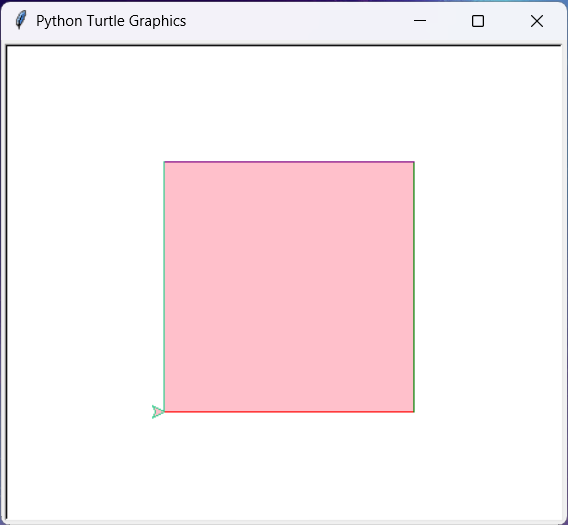
# -*- coding: UTF-8 -*-
#turtle.py
#导入turtle库画一个正方形
import turtle as t
color = ['red','green','purple','#33cc8c']
t.penup()
t.begin_fill()
t.goto(-100,-100)
t.pendown()
for i in range(4):
t.pencolor(color[i])
t.forward(200)
t.left(90)
t.fillcolor('pink')
t.end_fill()
t.down()
truele
1
2
3
4
5
# -*— coding: UTF-8 -*-
#making_pizza.py
from pizza import make_pizza as mp
mp(16, 'pepperoni')
mp(12, 'mushrooms', 'green peppers', 'extra cheese')

导入模块中的所有函数

from module_name import *

1
2
3
from pizza import *
make_pizza(16, 'pepperoni')
make_pizza(12, 'mushrooms', 'green peppers', 'extra cheese')

创建和使用类

1
2
3
4
5
6
7
8
9
10
11
12
13
14
#dog.py
class Dog():
"""一次模拟小狗的简单尝试"""
def __init__(self, name, age):
#注意:init左右两边各有2个”_"是"__"不是"_"
"""初始化属性name和age"""
 self.name = name
self.age = age
def sit(self):
"""模拟小狗被命令时蹲下"""
print(self.name.title() + " is now sitting.")
def roll_over(self):
"""模拟小狗被命令时打滚"""
print(self.name.title() + " rolled over!")

__init__()是一个特殊的方法,对定义类的属性进行初始化,python自动调用,类似于C++的构造函数。

注意:init左右两边各有2个”__“是”__“(两个英文下划线)不是”_”

在这个方法的定义中,形参self必不可少,还必须位于其他形参的前面。

Python调用这个__init__()方法来创建类实例时,将自动传入实参self。每个与类相关联的方法调用都自动传递实参self,它是一个指向实例本身的引用,让实例能够访问类中的属性和方法。

创建类实例

调用实例的属性

1
2
3
4
5
6
7
8
9
10
11
12
13
#dog.py
#coding=UTF-8
class Dog():
def __init__(self,name,age):
self.name=name
self.age=age
def sit(self):
print(self.name.title() + "is now sitting.")
def roll_over(self):
print(self.name.title() + "rolled over!")
my_dog=Dog("willie",6)#创建抽象类的实例化对象
print("My dog's name is "+ my_dog.name.title())
print("My dog is "+str(my_dog.age)+"years old.")
1
2
My dog's name is Willie.
My dog is 6 years old.

调用实例的方法

1
2
3
4
5
6
7
8
9
10
11
12
13
#dog.py
#coding=UTF-8
class Dog():
def __init__(self,name,age):
self.name=name
self.age=age
def sit(self):
print(self.name.title() + "is now sitting.")
def roll_over(self):
print(self.name.title() + "rolled over!")
my_dg=Dog('willie',6)#创建抽象类的实例化对象
my_dog.sit()#利用对象调用其包含的方法
my_dog.roll_over()#利用对象调用其包含的方法
1
2
Willie is now sitting.
Willie rolled over!

创建多个实例

1
2
3
4
5
6
7
8
9
10
11
12
13
14
15
16
17
18
19
20
21
#dog.py
#coding=UTF-8
class Dog():
def __init__(self,name,age):
self.name=name
self.age=age
def sit(self):
print(self.name.title() + "is now sitting.")
def roll_over(self):
print(self.name.title() + "rolled over!")
#创建多个实例对象
my_dog = Dog('willie', 6)
your_dog = Dog('lucy', 3)
#对my_dog对象进行运用
print("My dog's name is " + my_dog.name.title() + ".")
print("My dog is " + str(my_dog.age) + " years old.")
my_dog.sit()
#对your_dog对象进行运用
print("\nYour dog's name is " + your_dog.name.title() + ".")
print("Your dog is " + str(your_dog.age) + " years old.")
your_dog.sit()
1
2
3
4
5
6
7
My dog's name is Willie.
My dog is 6 years old.
Willie is now sitting.

Your dog's name is Lucy.
Your dog is 3 years old.
Lucy is now sitting.

给属性指定默认值

类中的每个属性都必须有初始值,哪怕这个值是0或空字符串。

1
2
3
4
5
6
7
8
9
10
11
12
13
14
15
16
17
#car.py
class Car():
def __init__(self, make, model, year):
"""初始化描述汽车的属性"""
self.make = make
self.model = model
self.year = year
self.odometer_reading = 0
def get_descriptive_name(self):
"""返回整洁的描述性信息"""
long_name = str(self.year) + ' ' + self.make + ' ' + self.model
def read_odometer(self):
"""打印一条指出汽车里程的消息"""
print("This car has " + str(self.odometer_reading) + " miles on it.")
my_new_car = Car('audi', 'a4', 2016)
print(my_new_car.get_descriptive_name())
my_new_car.read_odometer()
1
2
2016 Audi A4
This car has 0 miles on it.

修改属性的值

三种不同的方式修改属性的值:

  • 直接通过实例进行修改;
  • 通过方法进行设置;
  • 通过方法进行递增(增加特定的值)。

直接通过实例进行修改

1
2
3
4
5
6
7
8
9
10
11
12
13
14
15
16
17
18
19
#car.py
class Car():
def __init__(self, make, model, year):
"""初始化描述汽车的属性"""
self.make = make
self.model = model
self.year = year
self.odometer_reading = 0
def get_descriptive_name(self):
"""返回整洁的描述性信息"""
long_name = str(self.year) + ' ' + self.make + ' ' + self.model
def read_odometer(self):
"""打印一条指出汽车里程的消息"""
print("This car has " + str(self.odometer_reading) + " miles on it.")
my_new_car = Car('audi', 'a4', 2016)
print(my_new_car.get_descriptive_name())
'''修改属性值'''
my_new_car.odometer_reading = 23
my_new_car.read_odometer()
1
2
2016 Audi A4
This car has 23 miles on it.

通过方法进行设置属性值

1
2
3
4
5
6
7
8
9
10
11
12
13
14
15
16
17
18
19
20
21
#car.py
class Car():
def __init__(self, make, model, year):
"""初始化描述汽车的属性"""
self.make = make
self.model = model
self.year = year
self.odometer_reading = 0
def get_descriptive_name(self):
"""返回整洁的描述性信息"""
long_name = str(self.year) + ' ' + self.make + ' ' + self.model
def read_odometer(self):
"""打印一条指出汽车里程的消息"""
print("This car has " + str(self.odometer_reading) + " miles on it
def update_odometer(self, mileage):
"""将里程表读数设置为指定的值"""
self.odometer_reading = mileage
my_new_car = Car('audi', 'a4', 2016)
print(my_new_car.get_descriptive_name())
my_new_car.update_odometer(23)
my_new_car.read_odometer()
1
2
2016 Audi A4
This car has 23 miles on it.

通过方法对属性的值进行递增

1
2
3
4
5
6
7
8
9
10
11
12
13
14
15
16
17
18
19
20
21
22
23
24
25
26
#car.py
class Car():
def __init__(self, make, model, year):
"""初始化描述汽车的属性"""
self.make = make
self.model = model
self.year = year
self.odometer_reading = 0
def get_descriptive_name(self):
"""返回整洁的描述性信息"""
long_name = str(self.year) + ' ' + self.make + ' ' + self.model
def read_odometer(self):
"""打印一条指出汽车里程的消息"""
print("This car has " + str(self.odometer_reading) + " miles on it
def update_odometer(self, mileage):
"""将里程表读数设置为指定的值"""
self.odometer_reading = mileage
def increment_odometer(self, miles):
"""将里程表读数增加指定的量"""
self.odometer_reading += miles
my_used_car = Car('subaru', 'outback', 2013)
print(my_used_car.get_descriptive_name())
my_used_car.update_odometer(23500)
my_used_car.read_odometer()
my_used_car.increment_odometer(100)
my_used_car.read_odometer()
1
2
3
2013 Subaru Outback
This car has 23500 miles on it.
This car has 23600 miles on it.

继承

使用super()函数将父类和子类串联起来。

创建子类的实例时,Python首先需要完成的任务是给父类的所有属性赋值。创建子类时,父类必须包含在当前文件中,且位于子类前面。

1
2
3
4
5
6
7
8
9
10
11
12
13
14
15
16
17
18
19
20
21
22
23
24
25
26
27
28
#electric_car.py
class Car():
"""一次模拟汽车的简单尝试"""
def __init__(self, make, model, year):
self.make = make
self.model = model
self.year = year
self.odometer_reading = 0
def get_descriptive_name(self):
long_name = str(self.year) + ' ' + self.make + ' ' + self.model
return long_name.title()
def read_odometer(self):
print("This car has " + str(self.odometer_reading) + " miles on it.")
def update_odometer(self, mileage):
if mileage >= self.odometer_reading:
self.odometer_reading = mileage
else:
print("You can't roll back an odometer!")
def increment_odometer(self, miles):
self.odometer_reading += miles
class ElectricCar(Car):
"""电动汽车的独特之处"""
def __init__(self, make, model, year):
"""初始化父类的属性"""
super().__init__(make, model, year)

my_tesla = ElectricCar('tesla', 'model s', 2016)
print(my_tesla.get_descriptive_name())
1
2016 Tesla Model S

给子类定义属性和方法

1
2
3
4
5
6
7
8
9
10
11
12
13
14
15
16
17
18
19
20
21
22
23
24
25
26
27
28
29
30
31
32
33
34
35
36
#electric_car.py
class Car():
"""一次模拟汽车的简单尝试"""
def __init__(self, make, model, year):
self.make = make
self.model = model
self.year = year
self.odometer_reading = 0
def get_descriptive_name(self):
long_name = str(self.year) + ' ' + self.make + ' ' + self.model
return long_name.title()
def read_odometer(self):
print("This car has " + str(self.odometer_reading) + " miles on it.")
def update_odometer(self, mileage):
if mileage >= self.odometer_reading:
self.odometer_reading = mileage
else:
print("You can't roll back an odometer!")
def increment_odometer(self, miles):
self.odometer_reading += miles
class ElectricCar(Car):
"""Represent aspects of a car,specific to electric vehicles."""
def __init__(self,make,model,year):
"""
电动汽车的独特之处
初始化父类的属性,在初始化电动汽车特有的属性
"""
super().__init__(make,model,year)
self.battery_size = 70
def describe_battery(self):
"""打印一条描述电瓶容量的消息"""
print("This car has a " + str(self.battery_size) + "-kWh battery.")

my_tesla = ElectricCar("tesla",'model s',2016)
print(my_tesla.get_descriptive_name())
my_tesla.describe_battery()
1
2
2016 Tesla Model S
This car has a 70-kWh battery.

父类函数重载

1
2
3
4
5
6
7
8
9
10
11
12
13
14
15
16
17
18
19
20
21
22
23
24
25
26
27
28
29
30
31
32
33
34
35
36
37
38
#electric_car.py
class Car():
"""一次模拟汽车的简单尝试"""
def __init__(self, make, model, year):#构造函数对类进行初始化
self.make = make
self.model = model
self.year = year
self.odometer_reading = 0
def get_descriptive_name(self):
long_name = str(self.year) + ' ' + self.make + ' ' + self.model
return long_name.title()
def read_odometer(self):
print("This car has " + str(self.odometer_reading) + " miles on it.")
def update_odometer(self, mileage):
if mileage >= self.odometer_reading:
self.odometer_reading = mileage
else:
print("You can't roll back an odometer!")
def increment_odometer(self, miles):
self.odometer_reading += miles
def fill_gas_tank(self,size):
print("This size of gas tank of the car is "+ str(size))
class ElectricCar(Car):
"""Represent aspects of a car,specific to electric vehicles."""
def __init__(self,make,model,year):
"""
电动汽车的独特之处
初始化父类的属性,在初始化电动汽车特有的属性
"""
super().__init__(make,model,year)
self.battery_size = 70
def describe_battery(self):
"""打印一条描述电瓶容量的消息"""
print("This car has a " + str(self.battery_size) + "-kWh battery.")
#对父类的fill_gas_tank()方法进行重载
def fill_gas_tank():
"""电动车没有油箱"""
print("This car doesn't need a tank!")

将实例用作属性

1
2
3
4
5
6
7
8
9
10
11
12
13
14
15
16
17
18
19
20
21
22
23
24
25
26
27
28
29
30
31
32
33
34
35
36
37
38
39
40
41
42
43
44
45
46
47
48
49
50
#electric_car.py
class Car():
"""一次模拟汽车的简单尝试"""
def __init__(self, make, model, year):#构造函数对类进行初始化
self.make = make
self.model = model
self.year = year
self.odometer_reading = 0
def get_descriptive_name(self):
long_name = str(self.year) + ' ' + self.make + ' ' + self.model
return long_name.title()
def read_odometer(self):
print("This car has " + str(self.odometer_reading) + " miles on it.")
def update_odometer(self, mileage):
if mileage >= self.odometer_reading:
self.odometer_reading = mileage
else:
print("You can't roll back an odometer!")
def increment_odometer(self, miles):
self.odometer_reading += miles
def fill_gas_tank(self,size):
print("This size of gas tank of the car is "+ str(size))
class Battery():
"""一次模拟电动汽车电瓶的简单尝试"""
def __init__(self, battery_size=70):
"""初始化电瓶的属性"""
self.battery_size = battery_size
def describe_battery(self):
"""打印一条描述电瓶容量的消息"""
print("This car has a " + str(self.battery_size) + "-kWh battery.")
def get_range(self):
"""打印一条消息,指出电瓶的续航里程"""
if self.battery_size == 70:
range = 240
elif self.battery_size == 85:
range = 270
message = "This car can go approximately " + str(range)
message += " miles on a full charge."
print(message)
class ElectricCar(Car):
"""电动汽车的独特之处"""
def __init__(self, make, model, year):
"""初始化父类的属性,再初始化电动汽车特有的属性"""
super().__init__(make, model, year)
self.battery = Battery()

my_tesla = ElectricCar('tesla', 'model s', 2016)
print(my_tesla.get_descriptive_name())
my_tesla.battery.describe_battery()
my_tesla.battery.get_range()
1
2
3
2016 Tesla Model S
This car has a 70-kWh battery.
This car can go approximately 240 miles on a full charge.

导入类

导入单个类

from 文件名 import 类名

1
2
3
4
5
6
7
8
9
10
11
12
13
14
15
16
17
18
19
20
21
22
23
24
25
26
27
28
29
#car.py
"""一个可用于表示汽车的类"""
class Car():
"""一次模拟汽车的简单尝试"""
def __init__(self, make, model, year):
"""初始化描述汽车的属性"""
self.make = make
self.model = model
self.year = year
self.odometer_reading = 0
def get_descriptive_name(self):
"""返回整洁的描述性名称"""
long_name = str(self.year) + ' ' + self.make + ' ' + self.model
return long_name.title()
def read_odometer(self):
"""打印一条消息,指出汽车的里程"""
print("This car has " + str(self.odometer_reading) + " miles on it.")
def update_odometer(self, mileage):
"""
将里程表读数设置为指定的值
拒绝将里程表往回拨
"""
if mileage >= self.odometer_reading:
self.odometer_reading = mileage
else:
print("You can't roll back an odometer!")
def increment_odometer(self, miles):
"""将里程表读数增加指定的量"""
self.odometer_reading += miles
1
2
3
4
5
6
#my_car.py
from car import Car
my_new_car = Car('audi', 'a4', 2016)
print(my_new_car.get_descriptive_name())
my_new_car.odometer_reading = 23
my_new_car.read_odometer()
1
2
2016 Audi A4
This car has 23 miles on it.

从一个模块中导入多个类

from 模块名 import 类名,类名

1
2
3
4
5
6
7
8
#my_cars.py
from electric_car import Car,ElectricCar

my_beetle = Car('volkswagen', 'beetle', 2016)
print(my_beetle.get_descriptive_name())

my_tesla = ElectricCar('tesla', 'roadster', 2016)
print(my_tesla.get_descriptive_name())
1
2
2016 Volkswagen Beetle
2016 Tesla Roadster

导入模块以及模块中的所有类

导入整个模块:

import 模块名

导入模块中的所有类:

from module_name import *

Python标准库

推荐几个查看Python标准库的网址:

Python官网的标准库

菜鸟教程的标准库

一、collestions库中的OrderedDict方法

OrderedDict()创建一个有序字典,它记录了键值对添加的顺序

1
2
3
4
5
6
7
8
9
10
from collestions import OrderedDict
#将字典的键和值的顺序进行记录
favorite_languages = OrderedDict()
#调用OrderedDict()函数创建favorite_languages空字典
favorite_languages['jen'] = 'python'
favorite_languages['sarah'] = 'c'
favorite_languages['edward'] = 'ruby'
favorite_languages['phil'] = 'python'
for name, language in favorite_languages.items():
print(name.title() + "'s favorite language is " +language.title() + ".")
1
2
3
4
Jen's favorite language is Python.
Sarah's favorite language is C.
Edward's favorite language is Ruby.
Phil's favorite language is Python.

二、random库中的randint()方法

randint()返回一个位于指定范围内的整数

文件操作

从文件中读取数据

**open( ‘files_name’)**打开文件并且返回一个文件对象,注意,该文件和当前执行的文件所在目录相同,如若不同则应该写入文件路径:

Linux 和OS X系统中的文件路径用’/‘斜杆

with open(‘text_files/filename.txt’) as file_object:

Windows系统中文件路径用’\‘反斜杠

with open(‘text_files\filename.txt’) as file_object:

1
2
3
4
5
with open('files_name.txt') as file_objecta:#files_name需要带上文件后缀
"""关键字with,让Python负责妥善地打开和关闭文件。"""
contents = file_object.read()
"""file_object.read()调用读取函数读取文件中的内容"""
print(contents.rstrip())#rstrip会删除字符串末尾的字符

逐行读取

**for line in file_object:**利用循环进行逐行读取文件内容

pi_digits.txt

3.1415926535
8979323846
2643383279

1
2
3
4
filename = 'pi_digits.txt'
with open(filename) as file_object:
for line in file_object:
print(line.rstrip())
1
2
3
3.1415926535
8979323846
2643383279

创建一个包含文件各行内容的列表

lines = file_object.readlines()
#调用readlines()函数将文件的各行存储在创建的列表中

1
2
3
4
5
filename = 'pi_digits.txt'
with open(filename) as file_object:
lines = file_object.readlines()
for line in lines:
print(line.rstrip())
1
2
3
3.1415926535
8979323846
2643383279

使用文件里的内容

1
2
3
4
5
6
7
8
9
#pi_string.py
filename = 'pi_digits.txt'
with open(filename) as file_object:
lines = file_object.readlines()
pi_string = ''
for line in lines:
pi_string += line.strip()
print(pi_string)
print(len(pi_string))
1
2
3.141592653589793238462643383279
32

写入文件

with open(filename,’a’) as file_object:#以附加模式打开文件

模式:

#读取模式‘r’

#写入模式’w,’打开前清空文件内容

#附加模式’a’

#读取和写入模式’r+’

file_object.write(“需要写入的内容”)

注意:

Python只能将字符串写入文本文件。要将数值数据存储到文本文件中,必须先使用函数str()将其转换为字符串格式。

1
2
3
4
5
6
#write_messages.py
filename = 'programming.txt'
with open(filename, 'w') as file_object:
file_object.write("I love programming.\n")
file_object.write("敬请T期待@")
file_object.write("KingWempity")

programming.txt

I love programming.
敬请T期待@KingWempity

存储数据

使用json模块来存储数据

通常使用文件扩展名.json来指出文件存储的数据为JSON格式。

json.dump()

函数json.dump()接受两个实参:要存储的数据以及可用于存储数据的文件对象。

1
2
3
4
5
6
7
8
9
#number_writer.py
import json
numbers = [2, 3, 5, 7, 11, 13]
filename = 'numbers.json'
with open(filename, 'w') as f_obj:
json.dump(numbers, f_obj)
"""
先导入模块json,再创建一个数字列表。我们指定了要将该数字列表存储到其中的文件的名称。通常使用文件扩展名.json来指出文件存储的数据为JSON格式。接下来,我们以写入模式打开这个文件,让json能够将数据写入其中。我们使用函数json.dump()将数字列表存储到文件numbers.json中。
"""

打开文件numbers.json

[2, 3, 5, 7, 11, 13]

json.load()

函数json.load()加载存储在filename.json中的信息

1
2
3
4
5
6
#number_reader.py
import json
filename = 'numbers.json'
with open(filename) as f_obj:
numbers = json.load(f_obj)
print(numbers)
1
[2, 3, 5, 7, 11, 13]

1
2
3
4
5
6
7
#remember_me.py
import json
username = input("What is your name? ")
filename = 'username.json'
with open(filename, 'w') as f_obj:
json.dump(username, f_obj)
print("We'll remember you when you come back, " + username + "!")
1
2
What is your name? Eric
We'll remember you when you come back, Eric!

1
2
3
4
5
6
#greet_user.py
import json
filename = 'username.json'
with open(filename) as f_obj:
username = json.load(f_obj)
print("Welcome back, " + username + "!")
1
Welcome back, Eric!

1
2
3
4
5
6
7
8
9
10
11
12
13
14
15
#remember_me.py
import json
# 如果以前存储了用户名,就加载它
# 否则,就提示用户输入用户名并存储它
filename = 'username.json'
try:
with open(filename) as f_obj:
username = json.load(f_obj)
except FileNotFoundError:
username = input("What is your name? ")
with open(filename, 'w') as f_obj:
json.dump(username, f_obj)
print("We'll remember you when you come back, " + username + "!")
else:
print("Welcome back, " + username + "!")

首次运行

1
2
What is your name? Eric
We'll remember you when you come back, Eric!
否则

1
Welcome back, Eric!

至此,本书第一部分基础知识已基本完结撒花❀❀❀

🎇🎇🎇

推荐几个个版本python知识学习的网址

菜鸟教程Python3

菜鸟教程Python

虽然都是菜鸟教程,但因为版本问题,版本界面有些许变化,笔者更适应第一个,因人而异,最适合自己的才是最好的!

Python.org

Python官网的文档,里面有一切想要了解的东西!教程、标准库、语言参考、安装用法……

笔者不才,如有错误还望读者指正,后续会更新评论版块,欢迎大家留言指正!!!

敬请T期待!

感谢各位读者朋友的支持和理解!❀❀❀

  • Title: Python从入门到实践
  • Author: 敬请T期待
  • Created at : 2024-01-21 10:12:16
  • Updated at : 2024-11-24 11:52:13
  • Link: https://kingwempity.github.io/2024/01/21/Python从入门到实践/
  • License: This work is licensed under CC BY-NC-SA 4.0.
Comments
On this page
Python从入门到实践